



Your GST return is ready, the figures have been checked and the tax liability has been handled, but the filing process stops at the verification stage because the expected Aadhaar-linked EVC or OTP is not arriving. This can be particularly stressful when a return deadline is approaching. Repeatedly requesting another code is not always the solution because the problem may involve the Aadhaar-linked mobile number, network delays, authorised signatory details or the verification method available for that taxpayer.
GST filing supports different authentication methods depending on the type of taxpayer and transaction. If one verification route is unavailable, the first step is to understand which alternative your GST account is actually permitted to use.
First Understand EVC, OTP and DSC
These terms are often used interchangeably, but they refer to different parts of electronic verification.
EVC means Electronic Verification Code. It is used to authenticate specified actions electronically.
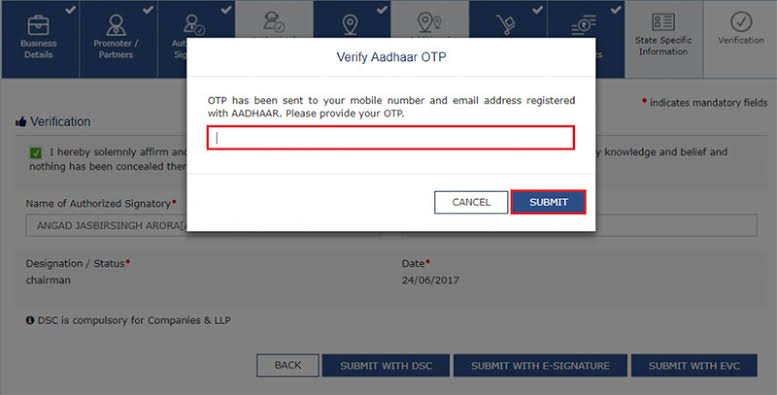
An OTP is a one-time password sent through an approved authentication process. Aadhaar-based authentication may involve an OTP sent to the mobile number registered with Aadhaar.
A DSC, or Digital Signature Certificate, is a digital signing method used for GST activities where permitted or required.
The options shown on the GST portal can depend on the taxpayer category and the particular form being filed.
Therefore, do not assume that every GST registrant will see exactly the same verification choices.
Why Is the Aadhaar OTP Not Arriving?
Before changing the verification method, identify whether the problem is temporary.
One common reason is that the mobile number currently being used is not the number linked with Aadhaar.
The GST portal cannot solve an Aadhaar OTP delivery problem simply because your GST registration contains another mobile number.
Other possible causes include temporary mobile-network delays, poor signal, SMS filtering, an inactive SIM or temporary problems with the authentication service.
Wait briefly and check the phone’s network connection before requesting another OTP.
Repeated requests in quick succession can create confusion over which OTP is the latest valid code.
Check the Mobile Number Linked With Aadhaar
A business owner may have changed their phone number several times since Aadhaar enrolment.
The number recorded in GST registration and the mobile number linked with Aadhaar are not necessarily the same.
If Aadhaar authentication is being used, the relevant Aadhaar-linked mobile access becomes important.
Suppose your GST profile uses your current mobile number ending in 4582, but Aadhaar still has an older number that you no longer control.
Updating only the GST profile would not automatically change the mobile information maintained for Aadhaar authentication.
The Aadhaar details need to be corrected through the applicable Aadhaar update process.
Check the Authorised Signatory
For entities such as companies, partnerships and LLPs, GST filing is performed through authorised persons rather than treating the business entity itself like an individual.
Check who is currently listed as the primary or relevant authorised signatory.
Problems can arise when an employee, director, partner or accountant who previously handled GST compliance has left the organisation but their information remains connected with the account.
If the authorised signatory details are outdated, update them through the appropriate GST registration amendment process.
Businesses should avoid allowing GST filing access to remain dependent on someone who no longer has authority to act for the organisation.
Can You Use DSC Instead?
A Digital Signature Certificate can be an important alternative for GST verification where DSC filing is available or required for the taxpayer and form.
The DSC is associated with the authorised signatory and allows documents or returns to be digitally signed.
If the GST portal provides a DSC filing option, check that the correct certificate is registered and valid.
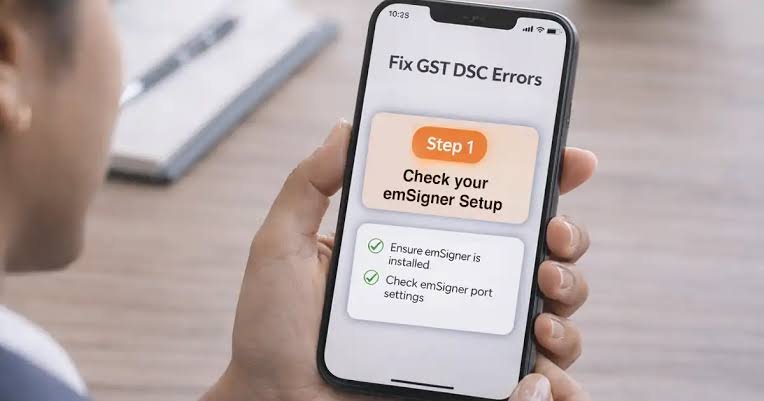
Also ensure that the required signing utility is installed and functioning correctly.
If the DSC has expired, belongs to a previous authorised signatory or is not properly registered with the GST account, simply choosing the DSC option will not solve the problem.
The digital-signature setup must first be corrected.
DSC Can Be Mandatory for Certain Taxpayers
Not every taxpayer has complete freedom to choose between EVC and DSC.
For certain categories of registered persons, GST procedures can require the use of a Digital Signature Certificate for specified filings.
This is particularly relevant to entities such as companies and LLPs in applicable situations.
Therefore, if an Aadhaar-related OTP is not arriving, first check whether Aadhaar OTP verification is actually the filing method required for the return you are trying to submit.
The GST portal normally displays the available filing options according to the taxpayer and form.
Follow the options applicable to your registration rather than trying to force a verification method that is not available.
What About EVC Through Registered Contact Details?
For eligible GST processes, the portal may provide an EVC-based verification option.
Where this method is available, the verification code is sent according to the contact and authorised-signatory information used by the GST system.
This is different from assuming that every EVC is an Aadhaar OTP.
If you select an EVC option and no code arrives, verify the registered contact information of the authorised signatory.
Check both the mobile number and email address where relevant.
Also look in the email spam or junk folder before concluding that no code was sent.
Do Not Share Verification Codes With Others
When an OTP fails to arrive, taxpayers sometimes contact people they find through online searches for urgent assistance.
Be careful.
An OTP, EVC or digital-signature credential is part of the authentication process for your GST account.
Do not give these codes to an unknown person claiming to be GST support.
Similarly, never share Aadhaar authentication codes, GST passwords or DSC PINs with people who do not have legitimate authority to use them.
If a consultant handles your GST work, maintain clear internal control over who is authorised to access the account.
Avoid Repeated OTP Requests
Requesting an OTP every few seconds rarely makes the process faster.
A newer request may make an earlier code unusable, depending on the authentication process.
Wait for the displayed validity or resend conditions before requesting another code.
When an OTP arrives, check when it was generated and use the latest valid one.
If several messages arrive together after a network delay, entering an older OTP can produce another verification failure even though SMS delivery has resumed.
What If No Verification Method Works?
If Aadhaar authentication fails, EVC does not arrive and DSC also produces an error, investigate the account rather than repeatedly attempting to file.
Check the authorised signatory, registered contact details, DSC status and browser session.
Try a fresh browser session if the portal itself appears unstable.
Take screenshots of persistent technical errors and record the date, time, GSTIN and return period.
If the problem remains unresolved, raise it through the GST support or grievance mechanism with enough information to identify the failed verification stage.
Do not include passwords or OTPs in screenshots or support messages.
Verify That the Return Was Actually Filed
Successful verification should result in the return moving to the appropriate filed status and the generation of the relevant acknowledgement.
After completing verification, return to the GST dashboard and confirm the filing status.
Do not assume that receiving an OTP or successfully signing with a DSC automatically means the entire filing process finished.
This final check is especially important if the portal displayed an error during verification.
When an Aadhaar-related code does not arrive, the practical approach is to identify the authentication method first. Check the Aadhaar-linked mobile number for Aadhaar OTP issues, review authorised-signatory details for GST EVC problems, and use DSC where it is available or required. That is safer than repeatedly requesting codes without knowing which system is causing the failure.
FAQs
Q1. Why am I not receiving an Aadhaar OTP during GST verification?
A: Possible reasons include an outdated Aadhaar-linked mobile number, network delay, inactive SIM or temporary authentication issue. Remember that your GST-registered mobile number and Aadhaar-linked mobile number may be different.
Q2. Can I file a GST return using DSC if the OTP is not received?
A: DSC may be used where it is available or required for the particular taxpayer and GST filing. The certificate must be valid and properly associated with the authorised signatory.
Q3. Is GST EVC the same as an Aadhaar OTP?
A: Not necessarily. EVC is an electronic verification mechanism used for eligible GST processes, while Aadhaar OTP relates specifically to Aadhaar-based authentication. The portal will show the applicable verification options.
Q4. What should I do if neither EVC nor DSC works?
A: Check the authorised signatory details, registered contact information, DSC validity and browser session. If the technical problem continues, preserve screenshots and relevant transaction details and report the issue through the official GST support process.